Last updated: November 19, 2026
Key Takeaways
- If you are unsure which records matter most, ask a qualified professional about your own situation.
- The transfer packet should include the records that help a new clinician reconstruct your pregnancy timeline: dating basis, glucose data, and treatment changes.
- Usually, the process is simple, but one missing lab page can still delay handoff for days.
- Ask for the records that let the new provider understand the diagnosis, timeline, and treatment changes in the first 5 minutes.
Your new provider needs your gestational diabetes records before the first visit, or the appointment starts blind. According to the U.S. Department of Health and Human Services, patients can ask for their records, and many offices can share them electronically or on paper. This Gestational Diabetes Record Transfer Checklist for New Providers tells you what to request, what to send, and what to do when a clinic only gives you part of the chart.
Who this checklist is for
This checklist is for someone moving gestational diabetes care to a new clinic, a new OB, or a new maternal-fetal medicine office, and it assumes you already know the name of the new provider and where the records came from. Because gestational diabetes care can change during pregnancy, speak with a qualified professional about your own situation if you are unsure which records matter most.
Picture this: you are trying to make a first visit work with only a phone call, two labs, and a stack of discharge papers. You need the chart to tell a clean story, not make the new office guess.
- Medical records office: the department that releases charts, imaging, and test results.
- Lab results: glucose testing, A1c if ordered, and any other blood work tied to pregnancy care.
- Ultrasound report: the written scan report, not just the image.
- Medication list: names, strengths, start dates, stop dates, and any insulin or other diabetes medicine used.
- Insurance card: the front and back image, if the new office asks for it.
The truth is, a partial transfer creates delays. If the new provider has to chase pregnancy dating, visit notes, and lab values one by one, the first visit can turn into a records hunt instead of a care visit.
What should be in the transfer packet?
The transfer packet should include the items that let the next clinician rebuild your pregnancy timeline in one sitting, including the dating basis, glucose data, and any treatment changes. If you are unsure which items to request, ask a qualified professional about your own situation. That usually means the documents below, even if the office uses a patient portal and even if the chart is “available in the system.”
Start with the essentials and then add anything unusual. A chart that looks complete to you may still be missing the one page the next office needs.
- Pregnancy dating information: last menstrual period if recorded, estimated due date, and the ultrasound that set dating if one was used.
- Prior visit summaries: the most recent prenatal and diabetes-related notes.
- Lab results: glucose tolerance test values, home log summaries if documented, and any other related labs.
- Ultrasound report: growth scan, anatomy scan, or fluid check reports.
- Medication list: every medicine, including prenatal vitamins and glucose-related drugs.
- Problem list: gestational diabetes, high blood pressure if present, and any pregnancy complications already listed.
- Allergy list: drug allergies and reactions, if recorded.
- Insurance card: current coverage details for the new office.
A generic record request that says “send everything” often misses the point. Ask for the pieces that show what changed, when it changed, and what was already tried. The CDC notes that gestational diabetes often appears during the 24th to 28th week of pregnancy, so the date trail matters.
How do I transfer gestational diabetes records?

You transfer gestational diabetes records by asking the old office for the exact chart items, asking how they want them sent, and confirming the new office received them before your visit. Usually, the process is simple, but the details matter: one missing lab page can slow down the handoff for days.
Here’s the catch: a medical records office may release some parts faster than others. Call early, ask for the documents by name, and check whether the release needs a signed form, photo ID, fax number, email, or portal message.
- Call the medical records office at the old clinic and ask what they need for release. Verify whether they want a signed authorization form, a copy of your ID, or both. A problem is a vague request like “my chart,” which often leaves out lab results or imaging.
- List the exact records you want sent: pregnancy dating, prior visit summaries, lab results, ultrasound report, medication list, and allergy list. Verify that the staff repeats each item back to you. A problem is leaving out one record type and finding out later that the new office does not have it.
- Ask for the delivery method: fax, secure email, portal upload, or direct electronic transfer. Verify the receiving fax number or email address letter by letter. If you are unsure which option is best, ask a qualified professional about the safest way to send your records. A problem is sending to the wrong location, which can delay care by several business days.
- Request a copy for yourself in PDF or paper form. Verify that the copy includes dates and page numbers. A problem is depending on one office-to-office send that you cannot track.
- Send the medication history as a separate, clear list if the chart printout is messy. Include strength, start date, stop date, and the reason it was used. Verify that any insulin, metformin, or other diabetes-related medicine is readable. A problem is a list with no dates, which makes it hard to see what is current.
- Confirm pregnancy dating is included in the packet. Verify the estimated due date and the report that established it. A problem is sending glucose records without the date that frames the whole pregnancy.
- Check receipt with the new office one to three business days before the appointment. Verify that they have opened the file, not just received it. A problem is assuming “sent” means “reviewed.”
A good transfer packet is short enough to scan and complete enough to guide care. The goal is not volume; it is a clean handoff.
What records should I request first?
You should request the records that let the new provider understand the diagnosis, the timeline, and any treatment changes in the first 5 minutes of review. If the office can only send a few things first, start with the documents that affect decisions most.
Because the pregnancy timeline depends on dates, start there. If you have a dated glucose screen or a dated diagnosis, it helps the new office sort the rest in order.
Picture this: you are standing at the medical records office window, and the staff is asking what to pull. If you have a short, exact list, the request moves faster and comes back cleaner.
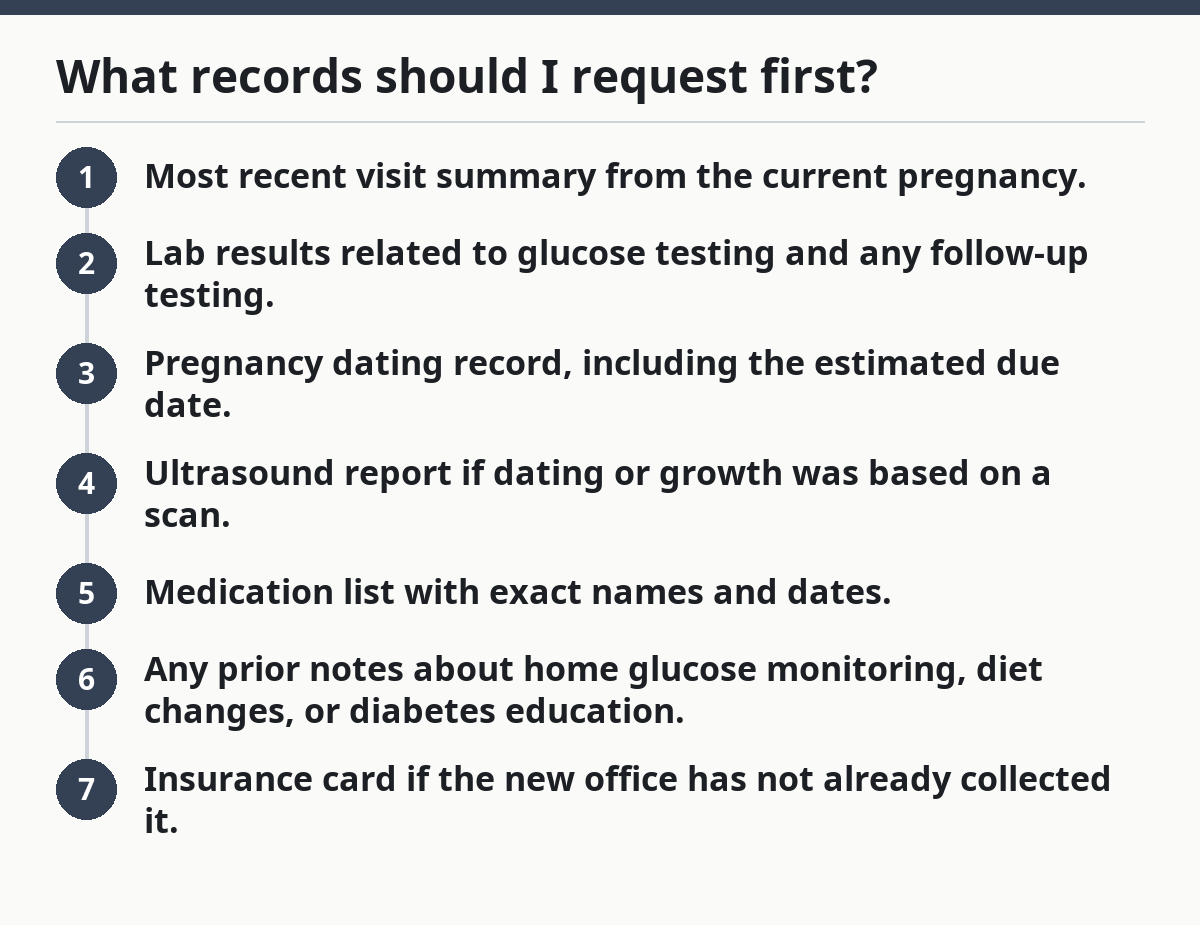
Prioritize these in order:
- Most recent visit summary from the current pregnancy.
- Lab results related to glucose testing and any follow-up testing.
- Pregnancy dating record, including the estimated due date.
- Ultrasound report if dating or growth was based on a scan.
- Medication list with exact names and dates.
- Any prior notes about home glucose monitoring, diet changes, or diabetes education.
- Insurance card if the new office has not already collected it.
If the old office offers only “a chart export,” ask whether the export includes images and scanned documents. One page can carry the date, and another can carry the result. That can take extra time to sort out.
When does the standard transfer method not work?
The standard method does not work when the chart is split across systems, the pregnancy dates changed, or the clinic only sends partial notes. In those cases, you need a second request and, sometimes, a direct call between offices.
Use a different approach in these situations:
- The ultrasound report is missing: the new provider may not be able to confirm dating or growth details — ask the imaging department for the full written report, not just the image summary.
- Lab results arrived without reference ranges: the numbers can be hard to interpret — request the full lab page with dates and lab names.
- Medication changes happened mid-pregnancy: a plain med list may hide stop dates — ask for the visit note that explains the change.
- The new clinic uses a different portal or EHR: the electronic chart may not cross over cleanly — request faxed copies and a printed packet as backup.
- You have records from more than one clinic: the timeline can split into pieces — ask each office for its own summary, then bring both to the first visit.
That is why the best transfer is often boring: one packet, one date range, one clean path. Split records are where confusion starts.
What are the most common mistakes?
The most common mistakes are small, but they cost time and sometimes force a repeat request. A missing date or an unreadable scan can turn a 10-minute records task into a week-long chase.
Picture this: you think everything is sent, but the new office still cannot tell when the diagnosis was made or what dose was used. That is the kind of problem that usually comes from one of these errors.
- Requesting “everything” without naming the records: the office may send pages that do not help — ask for specific items instead.
- Leaving out pregnancy dating: the new clinician loses the frame for interpreting labs and scans — include the estimated due date and the record that set it.
- Sending photos of paper instead of the original record: images can cut off values or dates — send the source document whenever possible.
- Forgetting medication start and stop dates: the new provider may not know what was current — add dates to every medicine.
- Skipping receipt confirmation: a file can sit unopened — call or message the new office to verify it arrived.
The best alternative is simple: build a 1-page cover sheet with your name, date of birth, due date, current provider, new provider, and the record items included. That makes the packet easier to sort.
How do I know the new clinic got what it needs?
The new clinic got what it needs when it can see the timeline, the lab values, the ultrasound report, and the medication list without calling you back for basics. If the staff says they are still missing a key piece, treat that as a gap to fill before the visit.
This is where a short check helps:
- Did they receive the lab results?
- Do they have the ultrasound report?
- Is the medication list readable and current?
- Is the pregnancy dating page present?
- Did they get the insurance card if they asked for it?
If the answer is no to any of those, send the missing item again and ask for confirmation. A “maybe” is not enough when the appointment is close.
Where the care team fits in
The care team can help sort records, but the new provider still needs a clean transfer packet to work from. That matters because gestational diabetes care often involves more than one office, and each office may document a different piece of the story.
For a broader look at who may be involved, the hub on gestational diabetes care team explains how the pieces fit together. This page stays on the handoff itself: what to request, how to send it, and what to verify.
What should be sent to a new clinic?
The new clinic should get the parts of the chart that answer three questions: what was found, what changed, and what is current. That means the diagnosis basis, the follow-up data, and the latest treatment notes.
Send these items together if you can:
- Lab results tied to gestational diabetes
- Prior visit summaries from the current pregnancy
- Ultrasound report for dating or growth
- Medication list with dates and doses listed clearly
- Pregnancy dating record
- Insurance card if the office requests it
A thin packet slows the first visit. A complete packet lets the new office spend time on care, not records. The American College of Obstetricians and Gynecologists notes that gestational diabetes is typically screened in mid-pregnancy, which is another reason the dates matter.
What records should I bring to a new gestational diabetes doctor?
Bring the records that show your pregnancy date, glucose testing, medication history, and recent visit notes. The new doctor also needs any ultrasound report and the current insurance card if the office asks for it. If you have more than one clinic involved, bring the summary from each one so the timeline stays intact.
How do I transfer gestational diabetes records?
Transfer gestational diabetes records by asking the medical records office for specific documents and confirming how they want them sent. Ask for lab results, ultrasound report, medication list, pregnancy dating, and prior visit summaries. Then verify that the new clinic received them before the appointment, not after.
What information should be sent to a new clinic?
Send the information that explains the pregnancy timeline and the diabetes care timeline: lab results, prior visit summaries, ultrasound report, medication list, pregnancy dating, and any allergies on file. If your old office has a portal copy, that can help, but it should not replace the original documents when the wording is unclear.
One-page checklist to use before the appointment
Use this as the final check before your visit:
- Current provider name and phone number
- New provider name and fax or portal details
- Pregnancy dating page
- Lab results related to gestational diabetes
- Ultrasound report
- Medication list with dates
- Prior visit summaries
- Allergy list
- Insurance card
- Confirmation that the new office received the packet
If one item is missing, ask for it again right away. A complete medical record transfer saves the next office from guessing, and it saves you from repeating the same story at the appointment.
Drafted with AI; not yet reviewed by a person.